
Origon’s Agentic Operating System: From AI Features to an AI-Native Stack
AI is no longer just a feature you bolt onto apps-it is becoming the environment everything runs in. Origon’s new Agentic Operating System is the clearest example of this shift: a full-stack platform where autonomous agents, not apps, become the primary way work gets done. For teams building AI-native products or internal automation, this marks a step change from “using AI” to running on AI.
From Apps to Agentic OS
In an earlier article, we explored how AI is moving from app-level features into the operating system layer on devices like phones, enabling intent‑driven actions across apps instead of manual tapping and swiping. That shift from “app-first” to “agent-first” computing is the backdrop for what Origon’s Agentic OS is doing at the platform level today.
Instead of treating an LLM as an API you call from your app, Origon treats agents as long-lived, memory-rich entities that can coordinate tools, talk to users, and collaborate with other agents to achieve outcomes. The “OS” is everything that surrounds them-runtime, orchestration, observability, governance, and integrations-packaged as one cohesive platform.
What is Origon’s Agentic OS
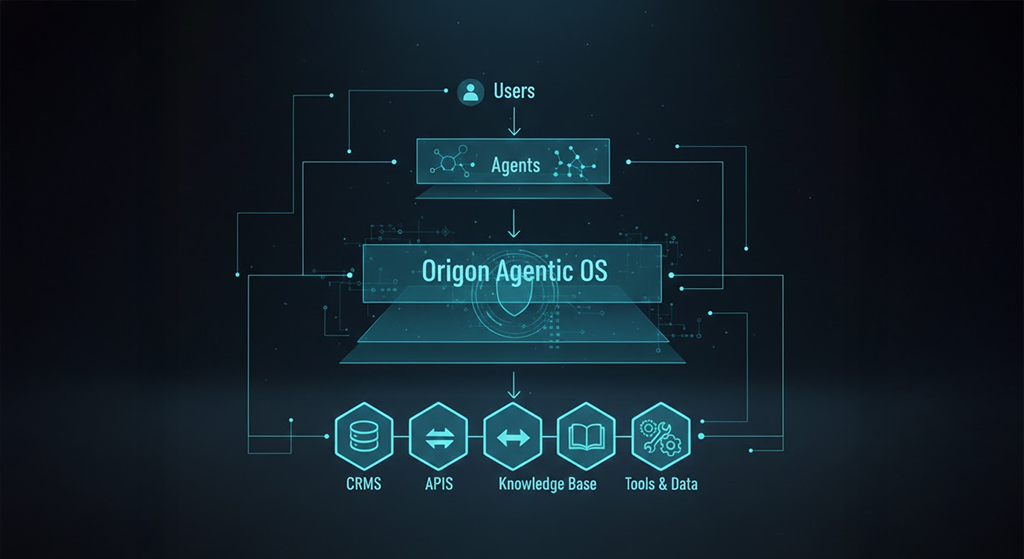
Origon’s Agentic Operating System sits between users, agents, and enterprise systems, orchestrating workflows across CRMs, APIs, knowledge bases, and internal tools.
Origon describes itself as a full-stack platform for designing, deploying, and observing production-grade AI agents. Under the hood, that means:
A high-performance runtime and orchestration layer that runs on dedicated infrastructure, engineered for low latency and reliability at scale.
A unified environment where LLMs, tools, memory, and external connectors work together instead of being wired manually with scripts or glue code.
A governance and observability layer that lets teams trace every decision, replay agent sessions, and enforce safety and compliance rules.
Rather than asking you to assemble your own stack (model provider, vector DB, queues, monitoring, UI), Origon gives you an opinionated Agentic OS that you can plug into your product or workflows directly.
The Core Building Blocks
1. Studio: Drag-and-Drop Agent Design
Studio is Origon’s visual layer for designing agents and multi-step workflows. Instead of hand-writing complex orchestration code, you can:
Create agents using drag-and-drop blocks that represent tools, actions, and decision points.
Define when agents should call APIs, consult knowledge, or escalate to humans.
Chain multiple agents together into end-to-end flows-for example, a “Lead Qualifier” agent handing off to a “Proposal Drafting” agent.
For product and marketing teams, this lowers the barrier to shipping complex agent behavior without waiting on engineering for every iteration.
2. Knowledge Base and Memory
A central promise of Origon’s OS is “agents grounded in your truth.” Through its knowledge base, you can:
Connect structured and unstructured data: pricing sheets, FAQs, API docs, product specs, pitch decks, and more.
Give agents persistent memory of past conversations, customer state, and previous actions.
Ensure responses stay consistent with your policies, brand, and domain-specific rules instead of hallucinating.
This is critical if you’re deploying agents in sales, support, or operations, where incorrect answers aren’t just annoying-they’re expensive.
3. Observability, Sessions, and Insights
In production, “it works on my laptop” is not enough. Origon bakes observability into the OS:
Session tracing lets you replay every step of an agent’s reasoning, tool calls, and messages.
Insights dashboards surface performance, reliability, error patterns, and business outcomes.
Human-in-the-loop tools allow operators to intervene, correct, and reinforce behaviors in real time.
This gives teams a clear way to debug, optimize, and continuously improve their agents instead of treating them as opaque black boxes.
4. Connectors and Execution Environment
Origon comes with hundreds of MCP connectors, APIs, and communication channels. This includes:
Channels: chat, voice, WhatsApp, Slack, and more for customer-facing agents.
APIs: CRMs, ticketing systems, payment platforms, and custom backends.
Custom code execution so your agents can run your own logic natively, not just call third-party tools.
Combined with the dedicated infra, this turns Origon into a true “execution environment” for agents, not just a prompt builder.
How Origon Differs from Traditional OS and Tooling
Traditional operating systems like Windows, macOS, or Linux manage processes, memory, and hardware-but they are fundamentally passive. They wait for users or applications to initiate actions.
An Agentic OS flips this:
Agents are autonomous actors that can decide what to do next, coordinate tools, and drive workflows end-to-end.
The OS is optimized for language-native interfaces, intent understanding, and multi-agent collaboration.
Observability and governance are built around behavior and decisions, not just CPU and RAM.
Compared to stitching together an LLM, vector DB, workflow engine, and monitoring stack yourself, Origon’s value is the opinionated integration: it is designed from day one for agent-first workloads.
Why This Matters Now
Over the next 3–5 years, multiple sources expect agentic operating systems to become the dominant way we interact with software, moving from point-and-click apps to goal-oriented dialogues. At the same time, enterprises are demanding:
Lower latency and higher reliability for customer-facing AI.
Stronger governance, tracing, and compliance around AI decisions.
Faster paths from prototype to production, without rewriting everything as adoption scales.
Origon’s Agentic OS is a response to this convergence: a platform that treats agents as production software, not lab experiments.
Practical Use Cases for Teams
Here are concrete ways teams can leverage Origon’s Agentic OS:
Sales and Marketing
Autonomous lead qualification agents that read inbound queries, check CRM history, and respond with tailored pitches.
Content generation agents grounded in your product docs and pricing, creating blogs, email sequences, and social posts that stay on-brand.
Customer Support
Multi-channel support agents on web, WhatsApp, and Slack that resolve issues, escalate intelligently, and keep a full history of context.
Agents that auto-summarize tickets and suggest actions to human agents.
Internal Operations
Workflow agents that coordinate between tools-HR systems, project management, and finance-based on natural language instructions.
Data agents that pull metrics, generate dashboards, and answer ad-hoc business questions.
These scenarios move beyond “ask a chatbot a question” into “delegate a task to an AI OS that can carry it from start to finish.”
The Reflect–Adapt–Evolve Loop
One important design principle in modern agentic systems is continuous improvement: agents observe their own behavior, receive feedback, and adapt. Origon’s architecture explicitly supports:
Reflection: capturing traces, outcomes, and human feedback.
Adaptation: updating prompts, policies, or strategies based on what works.
Evolution: rolling out improved behaviors to future sessions, while maintaining safety guardrails.
This turns agents into living systems that get better the more they are used, instead of static flows that require manual rework for every change.
How Product Teams Can Get Started
For teams exploring Origon’s Agentic OS, a practical adoption path might look like:
Start with a single high-impact agent.
Pick one workflow-support triage, lead qualification, or knowledge assistant-and build it in Studio with your existing data sources.
Wire in your knowledge and tools.
Connect your FAQ, product specs, pricing, and key APIs so the agent is grounded and useful from day one.
Measure and iterate.
Use sessions and insights to see where the agent struggles, then refine prompts, flows, and guardrails.
Expand into multi-agent systems.
As confidence grows, orchestrate specialized agents-research, writing, review, approval-into more complex AI-native workflows.
By approaching Origon as an operating system rather than a one-off feature, teams can gradually shift more of their digital work into an agentic model.
Frequently Asked Questions (FAQs)